What is a secret blog
A secret blog is an online journal that operates under a pseudonym or hidden identity. It allows writers to share thoughts without attaching their real name or personal details to the content. This practice is often called anonymous blogging, but true anonymity is technically difficult to achieve on public platforms like Blogger. Instead, most users aim for pseudonymity—separating their digital voice from their legal identity.
The goal is usually privacy, not invisibility. While you can hide your name and profile information, the platform itself still collects technical data. According to general definitions of anonymous blogging, achieving total secrecy requires sophisticated measures like layered encryption or using public computers, which are rarely practical for casual writers. For most people, a "secret" blog simply means using a pen name and keeping personal metadata out of the public view.
On Blogger, this setup involves configuring specific settings to remove author bylines and profile links. It is important to understand that the platform's terms of service and data retention policies still apply. You are creating a space that feels private to the reader, even if the backend retains records. This distinction matters for anyone concerned about digital footprint or personal safety.
The scope of this guide focuses on these practical steps for pseudonymity. We will look at how to configure Blogger to minimize public exposure while maintaining a functional blog. This approach balances the desire for privacy with the reality of how web platforms operate.
Set up anonymous Blogger settings
Hiding your identity on Blogger starts with the platform’s native profile configuration. The goal is to remove the direct link between your public posts and your real-world identity. Blogger defaults to displaying the account holder’s name and profile picture on every post, which serves as the primary digital fingerprint.
To begin, log in to your Blogger dashboard and navigate to the Settings tab. Select the Basic settings section. Here, you will find the Author Name field. Replace your legal name with a pseudonym. This change updates the byline that appears at the top of your posts. Ensure the pseudonym is consistent across all future posts to maintain a cohesive anonymous persona.
In the Basic settings, locate the Author Name field. Delete your real name and enter your chosen pseudonym. This name will appear as the byline on your blog posts. Save the changes immediately to ensure they propagate to existing drafts if you plan to edit them later.

Scroll down to the Profile Picture section in the same Basic settings panel. Click the Remove or Trash icon next to your current photo. Blogger allows you to post without an image. An empty profile slot is less identifiable than a generic avatar that might resemble you or contain metadata. Save the changes.
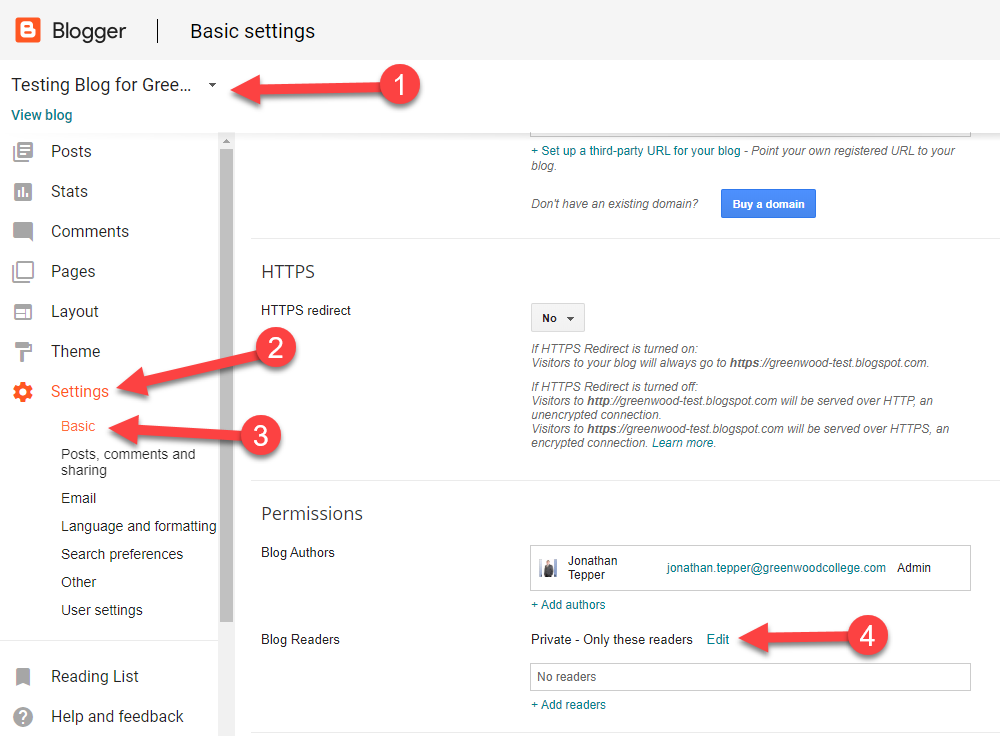
Navigate to the Permissions or Privacy tab in the Blogger settings. Look for the option to Show your profile on the blog. Toggle this setting to No. This prevents visitors from clicking your name to view a public profile page that might contain additional personal details or activity history. Save the changes.
-
Replace legal name with pseudonym in Author Name field
-
Remove profile picture from Basic settings
-
Disable public profile visibility in Permissions tab
-
Verify byline on a test post before publishing
These settings control the metadata attached to your content. While they hide your identity from casual readers, remember that Blogger’s backend still associates your account with your Google account. For complete anonymity, consider using a dedicated, unlinked Google account for the Blogger login credentials. This separation ensures that your primary digital identity remains distinct from your anonymous publishing channel.
Remove personal data and metadata
Even with a pseudonym, your blog posts can leak your identity through hidden digital footprints. Before publishing, you must scrub residual personal information from your drafts. This includes EXIF data embedded in images and accidental mentions of your real name, address, or workplace in the text.
Scrub image metadata
Photos taken with smartphones or digital cameras often contain Exchangeable Image File Format (EXIF) data. This metadata can include GPS coordinates, device model, and timestamps that reveal your location and habits. Blogger does not automatically strip this information when you upload images.
To remove it, use a dedicated metadata removal tool before uploading. Tools like ExifTool or online scrubbers can wipe the hidden data while preserving the image quality. This step ensures that a reverse image search or metadata analysis cannot trace the photo back to your device or location.
Audit your text for slips
Human error is the most common cause of anonymity breaches. Review every post for accidental references to your real name, previous employers, or local landmarks that identify you. Avoid using specific dates or times that could be cross-referenced with public records or social media activity.
Consider using a pseudonym consistently, but ensure it is not linked to any other online identity you hold. If you mention a specific event, generalize the details enough to remain anonymous while keeping the story engaging. This careful editing prevents readers from piecing together your true identity from contextual clues.
Manage comments and interactions
Comment sections are the most common point of failure for anonymous blogs. A single slip-up—a specific local reference, a unique voice pattern, or a reply that reveals too much—can unravel your anonymity. On Blogger, you must treat the comment section not as a social space, but as a controlled perimeter.
Enable moderation queues
The most effective way to prevent doxxing or accidental identity leakage is to require approval for every comment before it appears publicly. This gives you the ability to scrub metadata, remove identifying details, or delete hostile engagement before it becomes part of your blog’s public record.
To configure this, navigate to Settings > Posts and comments in your Blogger dashboard. Look for the Comment moderation section. Select Hold all comments for review. This ensures that no comment is visible to the public until you explicitly approve it. You can also enable Comment owner options to allow commenters to edit their comments, but be cautious, as this can sometimes lead to post-publication edits that reveal identity if the original comment was ambiguous.
Set strict comment rules
Even with moderation, you need clear boundaries. Blogger allows you to set basic comment policies, but you should also consider using a custom comment form or a third-party service if you require more granular control over user identity verification. However, for most secret bloggers, Blogger’s native tools are sufficient if used correctly.
Consider disabling comments entirely if the risk of interaction outweighs the benefit. If you choose to keep them open, make it clear in your blog’s footer or about page that comments are moderated. This sets expectations and discourages trolls who might try to bait you into revealing information.
Engage carefully
When you do respond to comments, maintain a consistent, neutral tone. Avoid using personal anecdotes or local references. Remember, your goal is to remain a disembodied voice. If a commenter asks for personal details or tries to engage in a way that feels too personal, it is safer to ignore or delete their comment rather than risk a back-and-forth that could expose you.
Common mistakes to avoid
Anonymity relies on consistency. A single slip in identity management can expose your real name, location, or personal habits. These frequent errors compromise the privacy of a secret blog on Blogger.
Reusing your primary email
Many bloggers create a dedicated Gmail or Outlook account for their anonymous project. This is a critical error. If you log into your secret blog using your main Google account, or if you recover a password using a linked recovery email, the association becomes public. Blogger’s account structure ties the blog to the Google profile. Keep your anonymous email isolated, with no links to your personal contacts or social media accounts.
Linking to social media profiles
It is tempting to add social sharing buttons or link your Twitter, Instagram, or Facebook profiles to the blog footer. This creates a direct bridge between your secret identity and your public persona. Search engines index these links. Even if you use a pseudonym on social media, the metadata or friend networks can reveal your true identity. Remove all external social links from your Blogger theme and settings.
Using real personal details in posts
Beyond technical settings, the content itself can be a liability. Avoid mentioning specific workplaces, local landmarks, or family members. Metadata in uploaded images can also leak GPS coordinates. Always strip EXIF data from photos before posting. These small details accumulate, allowing readers to triangulate your identity over time.

No comments yet. Be the first to share your thoughts!